
How Can We Help?
Media Library
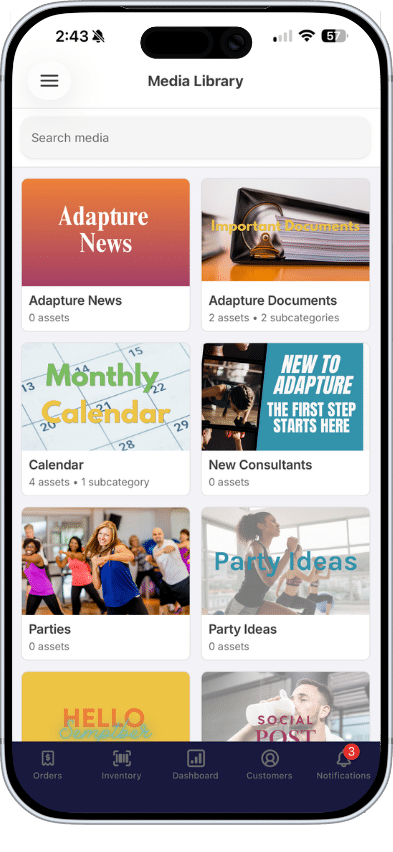
Wayroo’s Media Library gives you quick access to the content, resources, and marketing that your organization has made available to support your business.
From social sharing assets and promotional videos to training materials and business resources, everything is organized in one place so you can easily find what you need.
What Can You Find in the Media Library?
Your company may use the Media Library for a variety of content, including:
- Product images
- Promotional graphics
- Videos
- Social media content
- Training materials
- Business resources
- Event information
- Company announcements
Every organization organizes their library differently, so categories and available content may vary.
Note: New content may be added regularly, so check back often for updates.
Browsing the Media Library
Inside the Media Library, you can browse through categories to find available content.
Depending on what your company has provided, you may see:
- Images
- Videos
- Documents
- Text-only assets
- Links
Viewing Media
Select any asset to open and preview it.
Depending on the file type, you may be able to:
- Watch videos
- View images
- Read documents
- Preview marketing content before sharing
Sharing Content
Some assets may be marked as shareable by your company.
When sharing is enabled, you can quickly post content to supported social media platforms directly from the Media Library.
Your company may also provide pre-written captions or descriptions to help make sharing faster and easier while keeping messaging consistent.
Downloading Content
Some assets may also allow downloading.
If downloading is enabled, you can save the content directly to your device for future use.
If the download button is disabled, the asset is view-only and can only be accessed inside the Media Library.
Important Notes
The Media Library content and permissions are managed by your company. This means:
- Categories and organization may vary
- Some content may only be viewable
- Certain assets may not be shareable or downloadable
- Default captions and descriptions cannot be edited within the library
The Media Library is designed to help simplify content access and make it easier to find the tools and resources you need to support and grow your business.